How We Work
World of Charity Stitching (WOCS) brings together cross stitchers and finishers who collaborate to create a wide variety of projects. These completed gifts are donated to children in need and to elderly residents in nursing homes.
Our site has three main sections — Unfinished Gifts, Gifts To Be Donated, and Donated Gifts — which members use throughout the process of creating and donating finished pieces. Each section is described in more detail below.
Unfinished Gifts
The Unfinished Gifts section is where members choose the type of project they would like to stitch. Project types include:
- Bookmarks
- Holiday Card Cross Stitch Pieces
- Card Pieces for Quilts and Other Occasions
- Spring and Summer Cross Stitch Pieces
- Children’s Cross Stitch Pieces
- Future Quilts
…and many others.
Each project contains details about the types of patterns that are appropriate and any special requirements. If you don’t see a category that fits what you want to stitch, the Mixed Bag category accepts a wide variety of pieces. These pieces will later be assigned to a finisher based on size and image type.
Please keep in mind the types of finishes we create before stitching anything. If a piece is not appropriate for our audience, it may never be used.
IMPORTANT: Please review the Stitching Guidelines before you begin. Pieces that do not follow the guidelines may not be used or may not be featured on social media or the WOCS site.
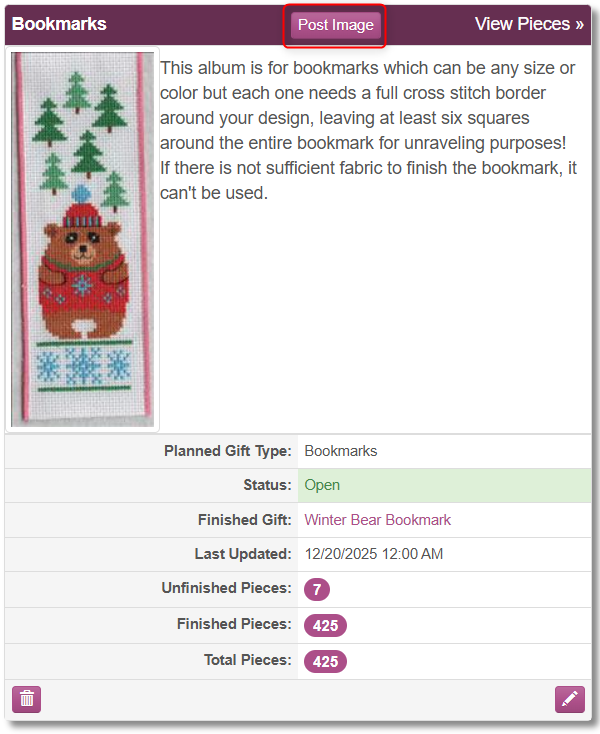 Once your piece is complete, use the Post Image button in the category that best matches your stitched piece. Fill out as much information as possible. Use a descriptive name to help finishers locate the piece later — many pieces look similar, so specificity is important. You may ignore the Tags field; it is used internally by admins and finishers. Including the pattern name and designer helps us track the piece and provides information we can use on Facebook if it is featured.
After posting your piece, contact Peggy or Anita through the Contact a Member page for mailing instructions.
Gifts To Be Donated
The Gifts To Be Donated section contains completed projects that are waiting to be delivered to an organization. Each finished gift includes details about the project and should be linked to the unfinished gift used to create it. This allows the stitcher to see where their piece was used and which organization received it.
Linking an Unfinished Gift to an Existing Finished Gift
To link an unfinished gift to an existing finished gift, follow these steps:
- Go to Unfinished Gifts and locate the piece in its project category. Alternatively, use the Individual Pieces tab to search for it.
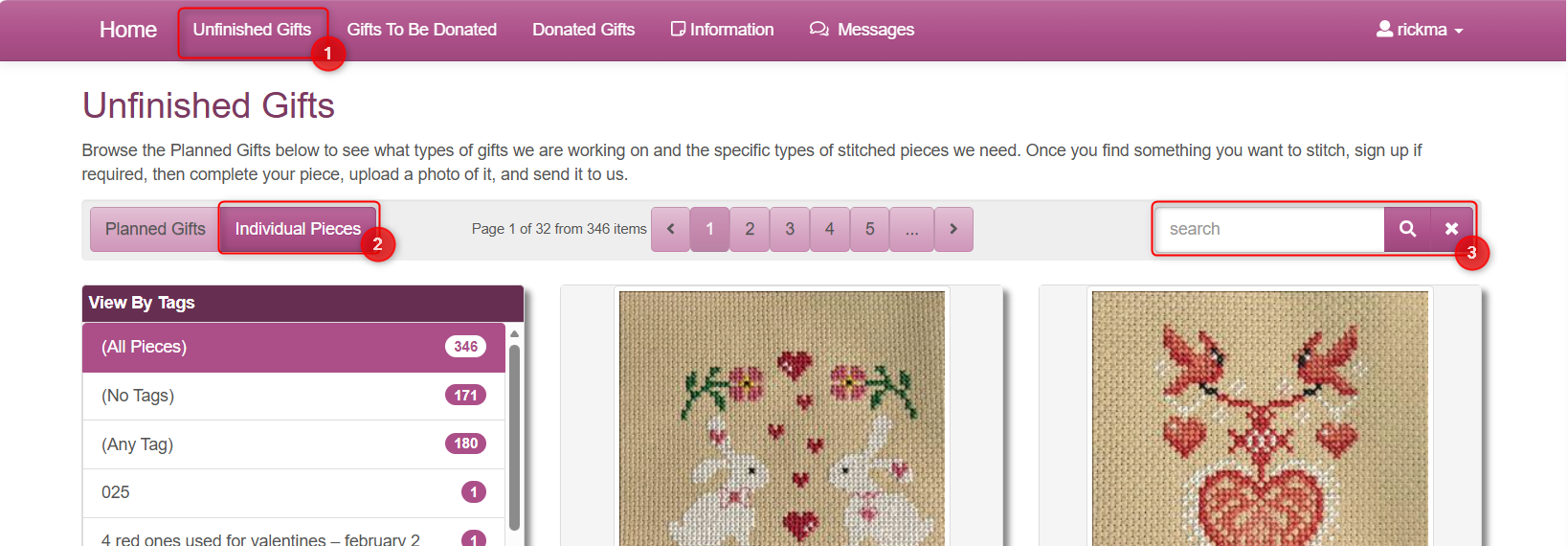
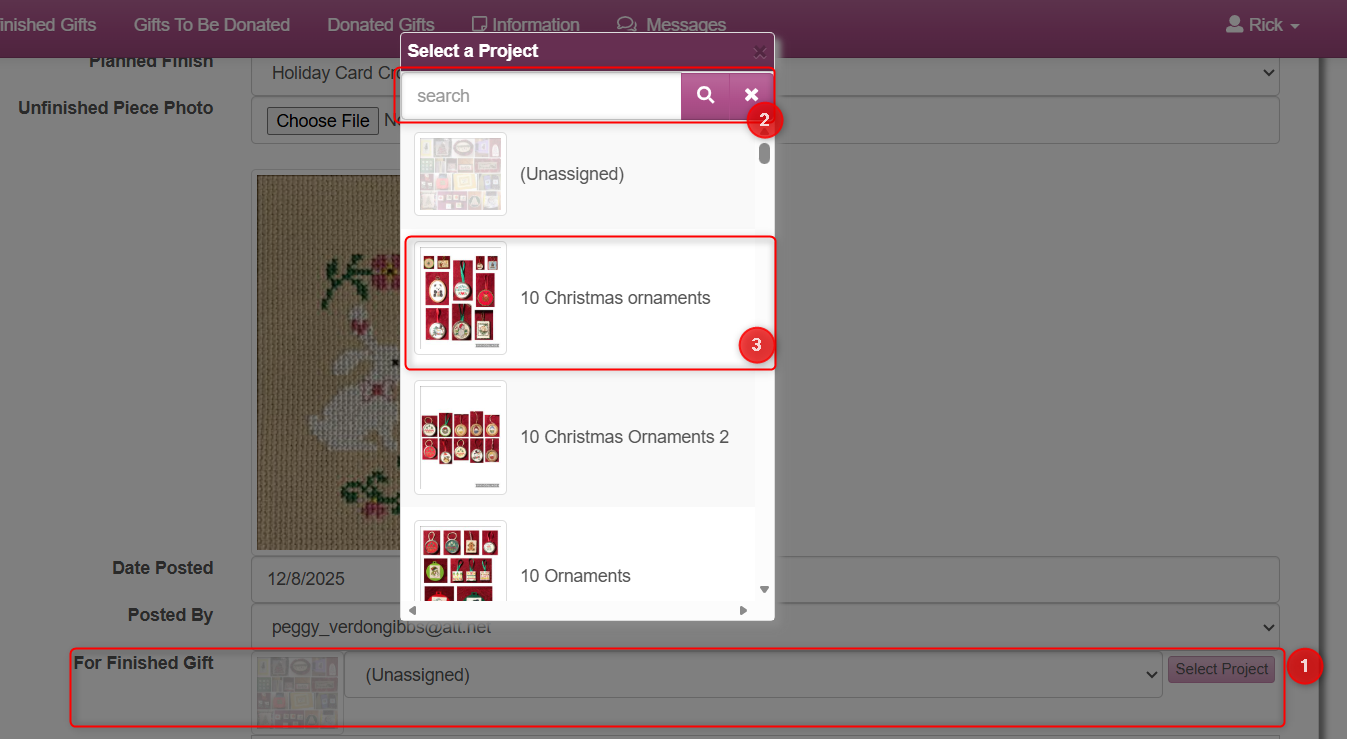
- Edit the unfinished piece and click the Select Project button under the For Finished Gift row. A pop-up window will appear showing the Gifts To Be Donated. Search or scroll to find the correct gift, then click it to select.
If you cannot find it in the pop-up, you may also use the dropdown menu.
-
Click the Save button to link the unfinished gift to the selected finished gift.
Creating a New Finished Gift from an Unfinished Gift
If no finished gift exists yet for an unfinished piece, follow these steps:
- Go to Unfinished Gifts and locate the piece in its project category, or search for it under Individual Pieces.
- Check the Save as New Finished Gift box in the upper-right corner.
- Edit the Name field. This will become the name of the finished gift, but will not change the name of the unfinished gift.
DO NOT UPLOAD A NEW PHOTO AT THIS TIME.
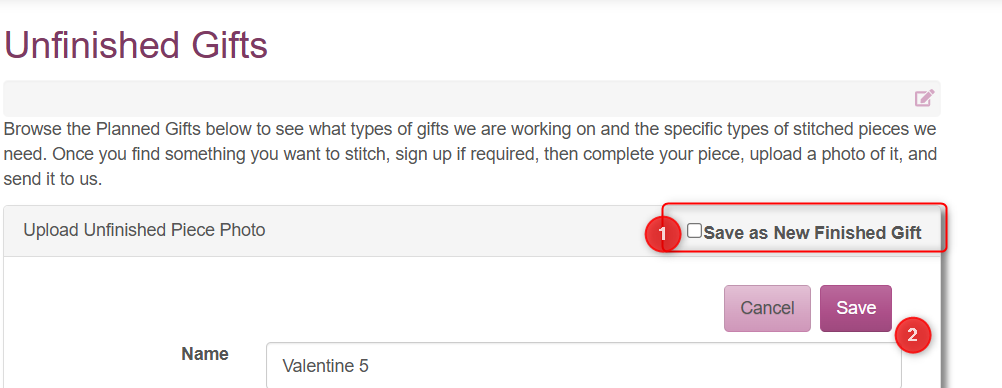
- Click Save to create the new finished gift linked to the unfinished piece.
- You will be taken to the Gifts To Be Donated page. Your new finished gift will appear at the top. Edit it and upload the photo of the finished gift.
- Click Save.
No Unfinished Gift
Sometimes a stitcher sends in a piece they have already finished themselves, such as a bookmark. In these cases, it is fine to create only a Finished Gift using the New Finished Gift button on the Gifts To Be Donated page. There is no need to link to an unfinished gift.

Donated Gifts
Donated Gifts are Finished Gifts that have been delivered to an organization. A finished gift becomes a donated gift when an administrator sets the 'Donated To' and 'Date Donated' fields.
For planning purposes, the Date Donated can be set without an actual date. When this happens, the gift will appear as Planned For. The Date Donated may also be set to a future date. The gift will remain listed as a planned donation until that date, at which point it will be recorded as a donated gift.
Finishers may also set the Donated To and Date Donated fields when creating a new Finished Gift.